Free stream assets · Windows app
Shorts Studio
Your Twitch clips,
turned into Shorts.
With your chat on screen.
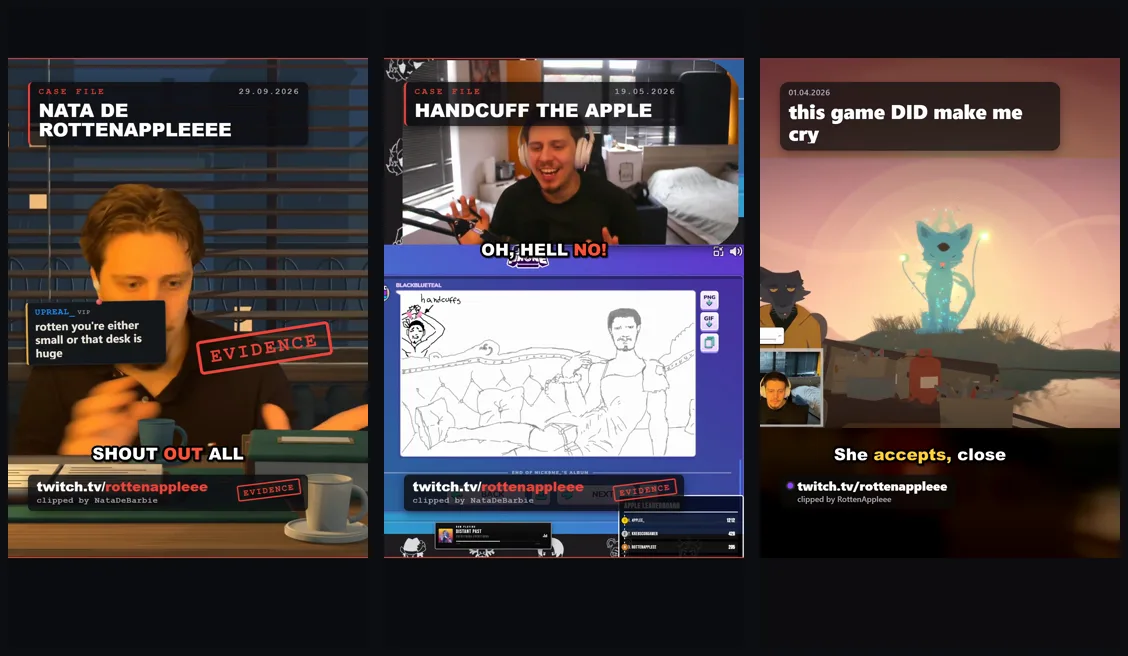
Pick a clip and Shorts Studio makes a vertical Short for YouTube and TikTok: cut to the good part, captioned word by word, with what your chat said at that moment and your own look. Change anything in a real editor, then post it. Built for the Rotten Apple stream, free for yours.
Version 0.2.0 · Windows 10/11 · Free and open source · No account, no watermark
What it does
From clip to Short in four steps
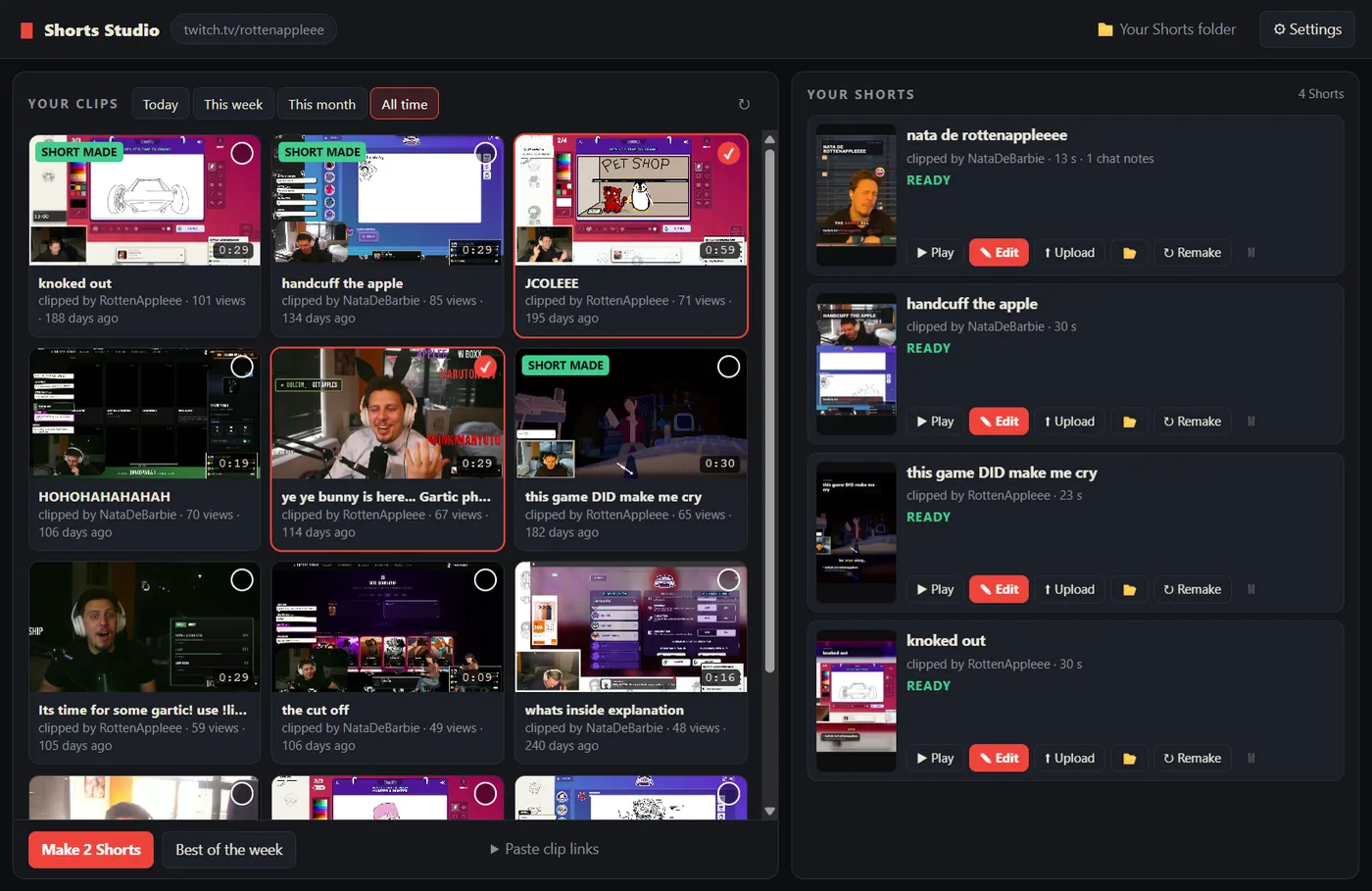
- 1Pick your clipsYour channel's clips from today, this week, this month or all time. Tick a few, or paste clip links from any channel.
- 2It makes the ShortCut to the good part, captions word by word, your chat on screen from the VOD, a title card and your channel. About half a minute each.
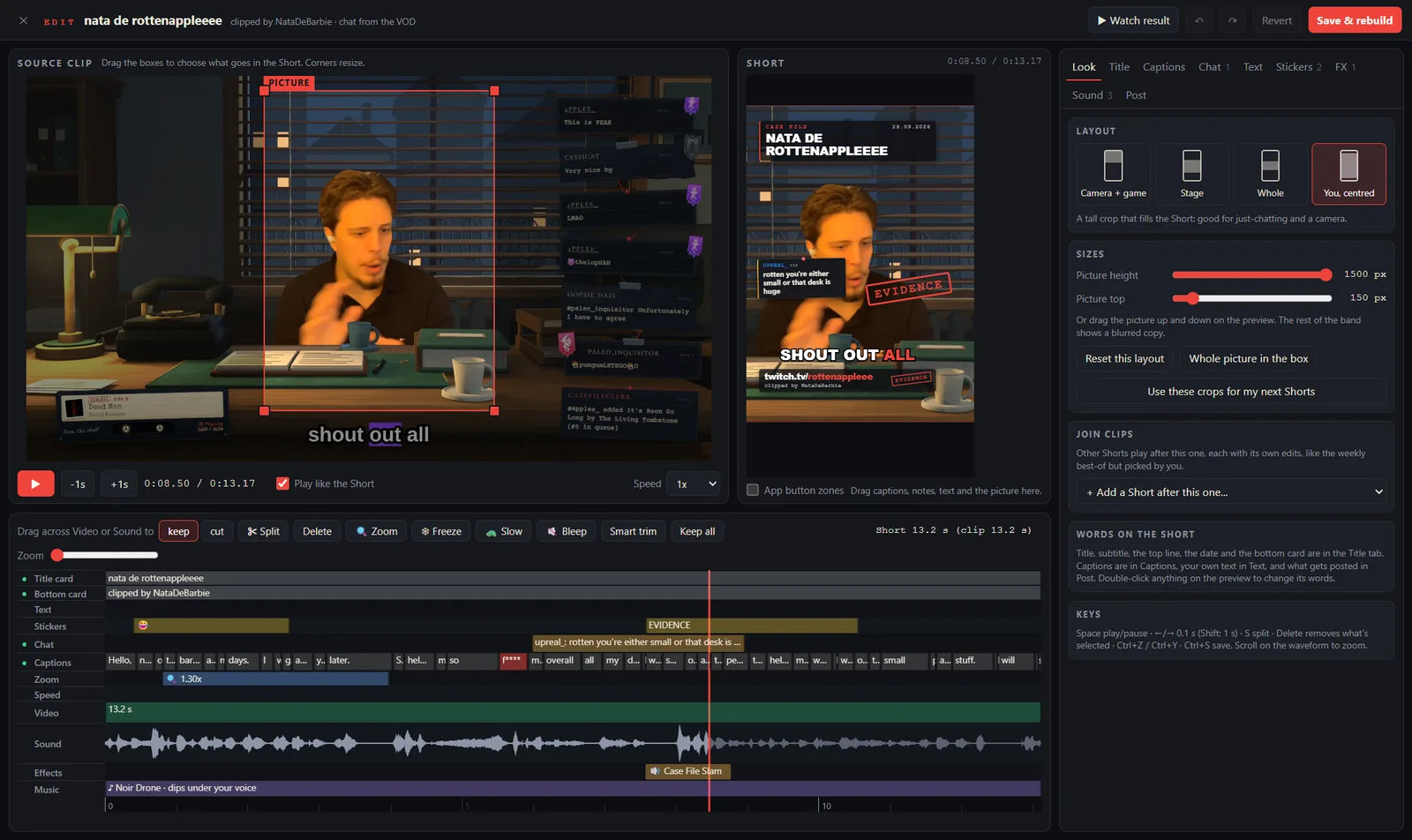
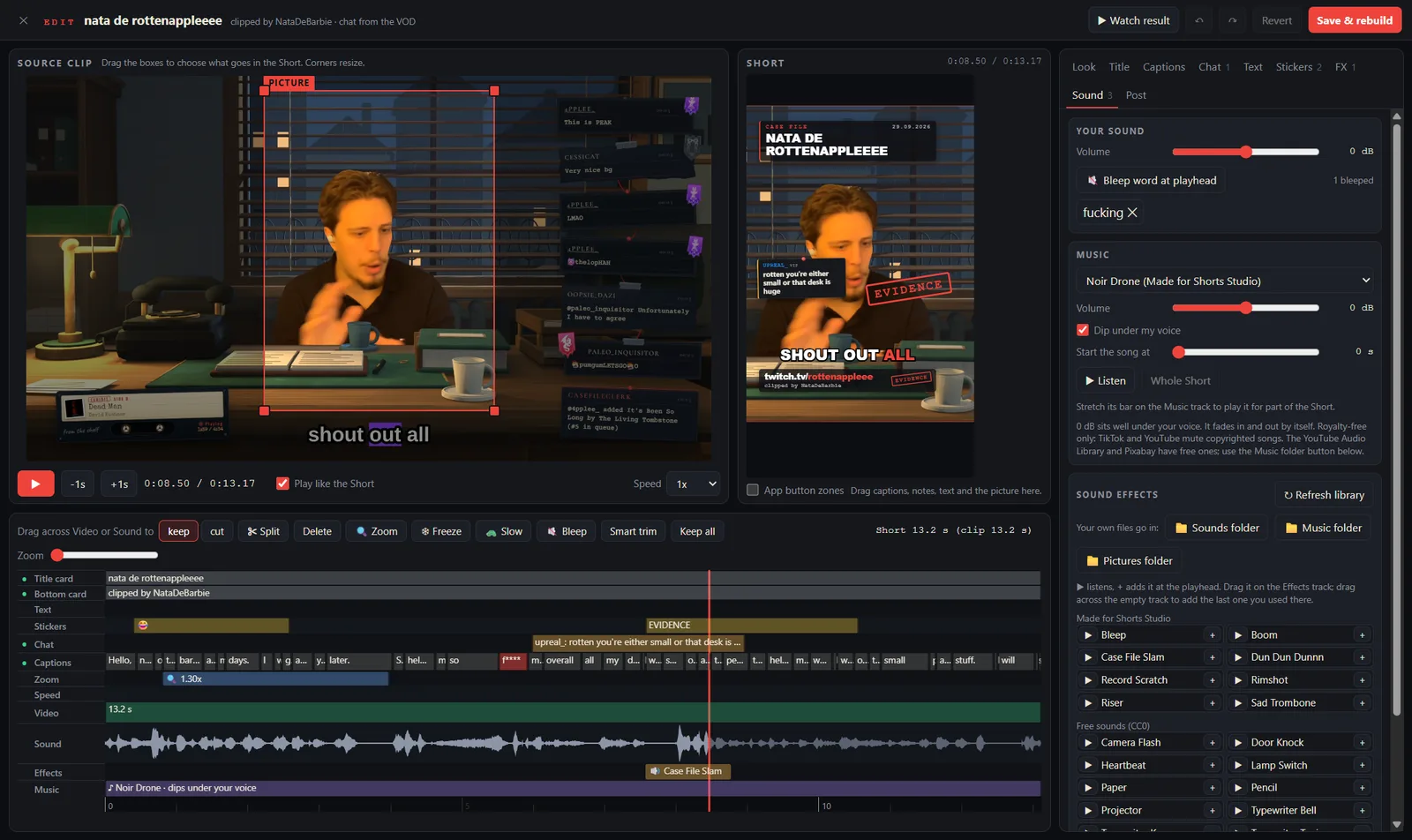
- 3Make it yoursA full editor: cut by words, crops, captions, chat, stickers, zooms, slow motion, sound effects, music, bleeps.
- 4Post itDrag it straight into YouTube's or TikTok's upload page, or post from the app and schedule it.
Why it's good
Everything a stream Short needs
Free and private
No account, no watermark, no subscription. It runs on your PC; nothing is uploaded until you post it.
Captions that fit
Word-by-word captions made on your PC. Five styles, colours, emoji, and bleeps for the words you'd rather not.
Your chat on screen
What chat said at that moment, from the VOD, with emotes, mods and VIPs in their colours.
Your look
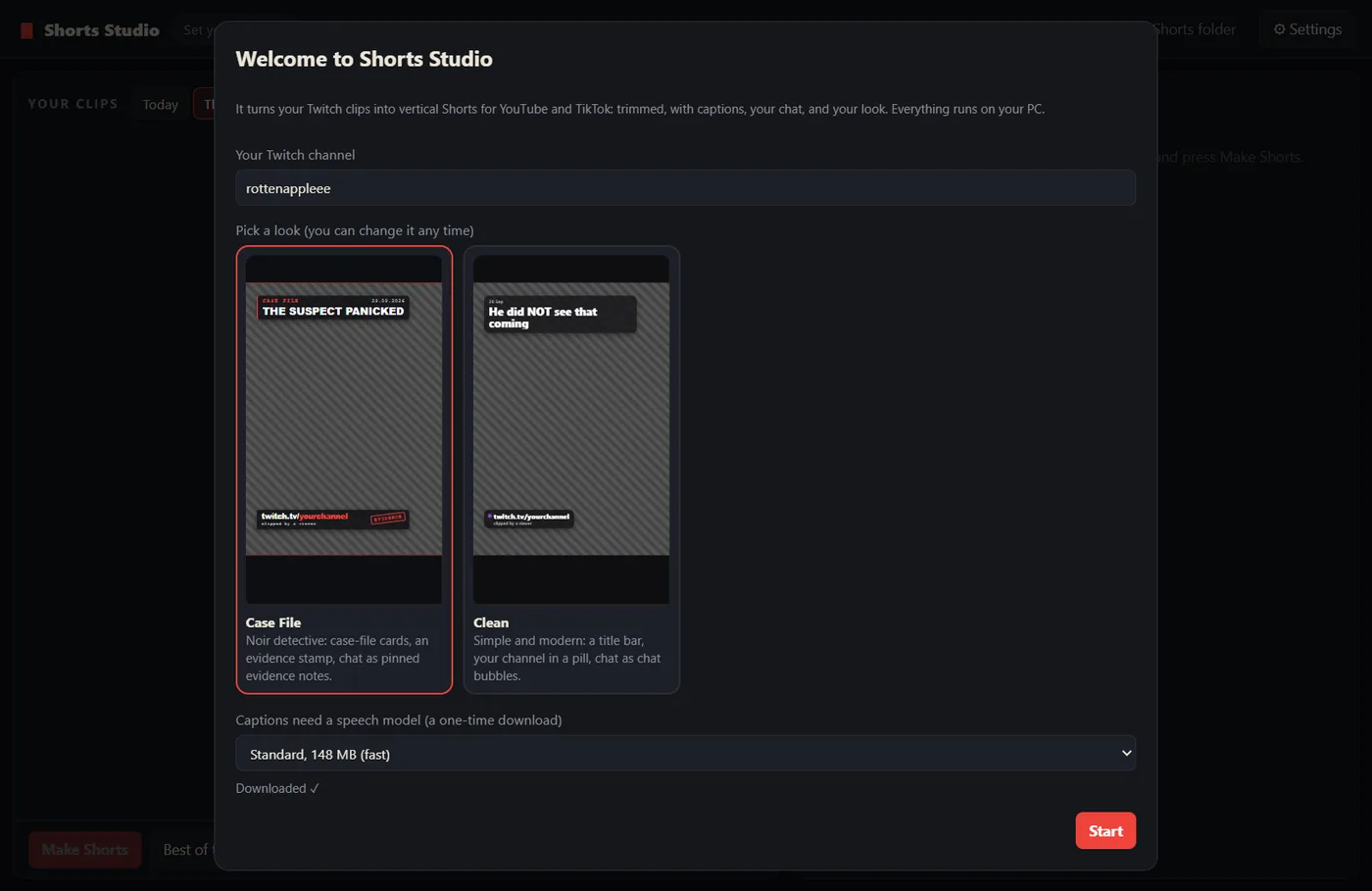
Two looks to start (Case File and Clean), your colour, your channel, and presets for the looks you reuse.
A real editor
Cut by words, In/Out marks, crops for camera and game, zoom-ins, slow motion, freeze frames, stickers and text.
Sound that works
Sound effects, music that ducks under your voice, and your own files.
Best of the week
One click joins the week's top clips into one Short.
Posts for you
Uploads to YouTube with scheduling, and sends to TikTok drafts or straight to your profile.
See it
What it looks like
Install
Two minutes, once
You need Windows 10 or 11 (64-bit). Shorts Studio is about 150 MB; the captions model adds 148 MB the first time.
Download it
Older versions and the release notes are on GitHub.
Run the installer
Windows will probably say "Windows protected your PC": Shorts Studio isn't code-signed yet, so Windows doesn't recognise it. Click More info, then Run anyway. Pick where to install it; you get a desktop shortcut.
Tell it your channel
Type your Twitch channel name, pick a look (you can change it any time), and press Start. The speech model for captions downloads once. Then tick some clips and press Make Shorts.
Posting
Straight to YouTube and TikTok
Drag it in
Drag a finished Short out of Shorts Studio and drop it on YouTube's or TikTok's upload page. Opening the page copies the title or caption, so you just paste.
YouTube
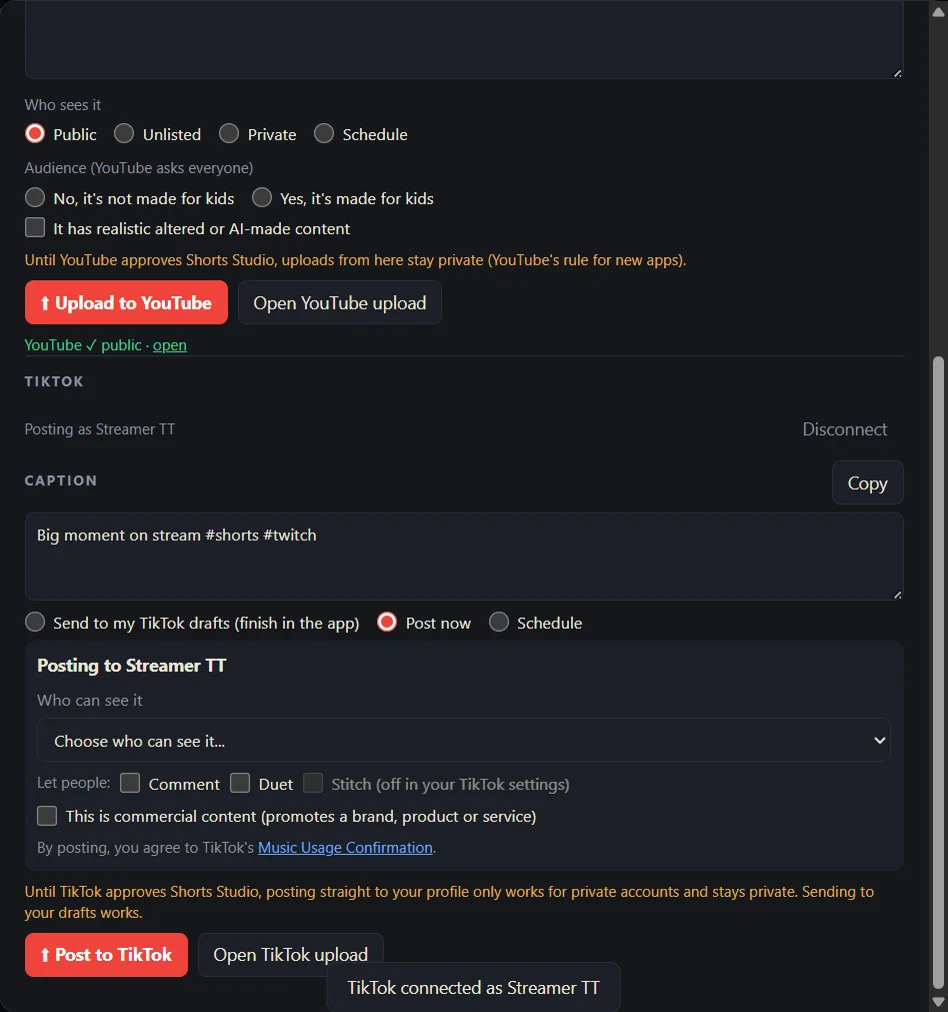
Connect your channel once, then upload as public, unlisted or private, or schedule it: YouTube publishes it at that time even if your PC is off.
TikTok
Send it to your TikTok drafts and post from your phone, or post straight to your profile, now or at a set time (keep Shorts Studio open then).
Posting from the app is new, and YouTube and TikTok review every app that posts for people. Until Shorts Studio is approved, YouTube keeps uploads from it private and TikTok only allows drafts and private posts, so dragging the Short into the upload page is the way to go public. Your sign-in stays on your PC; see the privacy policy.
Help
Quick fixes
Windows says "Windows protected your PC".
Shorts Studio isn't code-signed yet (a certificate costs money every year), so Windows doesn't recognise it. Click More info, then Run anyway. The source is open on GitHub if you'd like to check it.
Does it work on a Mac?
Not yet: Windows 10 or 11, 64-bit.
Does it upload my clips anywhere?
No. Clips are downloaded from Twitch to your PC, the Short is made on your PC, and it only goes to YouTube or TikTok when you post it.
My Short has no chat on it.
Chat comes from the stream's VOD. If VODs are off, or the VOD has expired (Twitch keeps them 7 to 60 days), there's nothing to show.
My clips already have captions burned in.
That's Twitch's own auto-captions. Turn off "Add captions when using Clip That" in your Twitch Creator Dashboard (Settings → Stream). For existing clips, Clips Manager → Edit lets you switch them off for about a month.
Captions are in the wrong language.
Settings → Captions → Language you stream in. The Best speech model (466 MB) is more accurate than Standard, especially for languages other than English.
Where are my Shorts?
In Videos\Shorts Studio. The 📁 button in the app opens it.
How do I update?
Download and run the installer again. Your Shorts, settings and presets stay.
Source on GitHub · Privacy policy · Terms · Twitch, YouTube and TikTok are trademarks of their owners; Shorts Studio isn't made by or connected to any of them.
Want a custom one?
Something built around your branding, or a widget that is not here yet.
Contact me on Twitch